

Reading Files and Split Apply Combine#
This lesson focuses on reviewing our basics with pandas and extending them to more advanced munging and cleaning. Specifically, we will discuss how to load data files, work with missing values, use split-apply-combine, use string methods, and work with string and datetime objects. By the end of this lesson you should feel confident doing basic exploratory data analysis using pandas.
OBJECTIVES
Read local files in as
DataFrameobjectsDrop missing values
Replace missing values
Impute missing values
Use
.groupbyUse built in
.dtmethodsConvert columns to
pd.datetimedatatypeWork with
datetimeobjects in pandas.
Reading Local Files#
To read in a local file, we need to pay close attention to our working directory. This means the current location of your work enviornment with respect to your larger computer filesystem. To find your working directory you can use the os library or if your system executes UNIX commands these can be used.
import os
import numpy as np
import pandas as pd
import matplotlib.pyplot as plt
import seaborn as sns
---------------------------------------------------------------------------
ModuleNotFoundError                       Traceback (most recent call last)
Cell In[1], line 5
      3 import pandas as pd
      4 import matplotlib.pyplot as plt
----> 5 import seaborn as sns

ModuleNotFoundError: No module named 'seaborn'
#pip install seaborn
#check working directory
os.getcwd()
'/Users/jacobkoehler/Desktop/fall_24/bootcamp_24'
#list all files in directory
os.listdir()
['continuous_starter.ipynb',
 'intro_to_numpy.ipynb',
 'exarr.npy',
 'subplottin.png',
 'bonus',
 'intro_to_plotting.ipynb',
 'numpy-challenge-3.ipynb',
 'requirements.txt',
 'numpy-challenge-1.ipynb',
 'html_data.ipynb',
 'images',
 'references.bib',
 'intro_probability.ipynb',
 'oop.ipynb',
 'notebooks.ipynb',
 'numpy-challenge-2.ipynb',
 'dates_intro_to_plotting.ipynb',
 'python_fundamentals_one.ipynb',
 'intro_to_pandas.ipynb',
 '_toc.yml',
 'logo.png',
 'homework',
 'data_apis.ipynb',
 '_build',
 '_config.yml',
 'python_fundamentals_two.ipynb',
 '.ipynb_checkpoints',
 'syllabus.ipynb',
 '.git',
 'plotting_seaborn.ipynb',
 'data',
 'hyp_testing.ipynb',
 'pandas_II.ipynb']
#what's in the data folder?
os.listdir('data')
['bus.csv',
 'bud.csv',
 'train.pkl',
 'chicago_crimes.csv',
 'bikeshare_data.csv',
 'doge.jpg',
 'polls.csv',
 'gt_drone_racing.csv',
 'Default.csv',
 'mileage.csv',
 'Ames_Housing_Sales.csv',
 'diamonds.csv',
 'wtgain.csv',
 'elecdemand.csv',
 'us-retail-sales.csv',
 'gapminder_all.csv',
 'GPA.xls',
 'w.npy',
 'v.npy',
 'Heart.csv',
 'DRP.csv',
 'Credit.csv',
 'jobs.csv',
 'insurance.csv',
 'airline-passengers.csv',
 'NOISE.csv',
 'uberx.csv',
 'LasVegasTripAdvisorReviews-Dataset.csv',
 'ufo.csv',
 'state_unemployment.csv',
 'tips_miss.csv',
 'book_sales.csv',
 'health_insurance_charges.csv',
 'PABMI.xls',
 'JOCKO.csv',
 'test.pkl',
 'airline.csv',
 '2017.csv',
 'Sample_Workforce_Data_0720.csv',
 'poll_means.csv',
 'salesdaily.csv',
 'doge.npy',
 'X.npy',
 'y.npy',
 'movie_ratings.tsv',
 'churn_missing.csv',
 'mtcars.csv',
 'office_supplies.csv',
 'train.csv',
 'bikeshare.csv',
 'diabetes.csv',
 'NBA_players_2015.csv',
 'df_predictions.pkl',
 'facefr.csv',
 'spotify.csv',
 'ads.csv',
 'pines.csv',
 'cars.csv',
 'geparts.csv',
 'cell_phone_churn.csv',
 'rollingsales_manhattan.csv',
 'AAPL.csv',
 'heart_cleveland_upload.csv']
#what is the path to ufo.csv?
ufo_path = 'data/ufo.csv'
read_csv#
Now, using the path to the ufo.csv file, you can create a DataFrame by passing this filepath to the read_csv function.
#read in ufo data
ufo = pd.read_csv(ufo_path)
# look at first 2 rows
ufo.head(2)
| City | Colors Reported | Shape Reported | State | Time | |
|---|---|---|---|---|---|
| 0 | Ithaca | NaN | TRIANGLE | NY | 6/1/1930 22:00 |
| 1 | Willingboro | NaN | OTHER | NJ | 6/30/1930 20:00 |
# high level information
ufo.info()
<class 'pandas.core.frame.DataFrame'>
RangeIndex: 80543 entries, 0 to 80542
Data columns (total 5 columns):
 #   Column           Non-Null Count  Dtype
---  ------           --------------  -----
 0   City             80496 non-null  object
 1   Colors Reported  17034 non-null  object
 2   Shape Reported   72141 non-null  object
 3   State            80543 non-null  object
 4   Time             80543 non-null  object
dtypes: object(5)
memory usage: 3.1+ MB
# numerical summaries
ufo.describe()
| City | Colors Reported | Shape Reported | State | Time | |
|---|---|---|---|---|---|
| count | 80496 | 17034 | 72141 | 80543 | 80543 |
| unique | 13504 | 31 | 27 | 52 | 68901 |
| top | Seattle | ORANGE | LIGHT | CA | 7/4/2014 22:00 |
| freq | 646 | 5216 | 16332 | 10743 | 45 |
# categorical summaries
ufo.describe(include = 'object')
| City | Colors Reported | Shape Reported | State | Time | |
|---|---|---|---|---|---|
| count | 80496 | 17034 | 72141 | 80543 | 80543 |
| unique | 13504 | 31 | 27 | 52 | 68901 |
| top | Seattle | ORANGE | LIGHT | CA | 7/4/2014 22:00 |
| freq | 646 | 5216 | 16332 | 10743 | 45 |
# all summaries
ufo.describe(include = 'all')
| City | Colors Reported | Shape Reported | State | Time | |
|---|---|---|---|---|---|
| count | 80496 | 17034 | 72141 | 80543 | 80543 |
| unique | 13504 | 31 | 27 | 52 | 68901 |
| top | Seattle | ORANGE | LIGHT | CA | 7/4/2014 22:00 |
| freq | 646 | 5216 | 16332 | 10743 | 45 |
# tips = sns.load_dataset('tips')
# tips.head()
# tips.describe(include = 'all')
Reading from url#
You can also load datasets from urls where a .csv (or other) file live. Github is one example of this. Note that you want to be sure to use the raw version of the file. For example, a github user dsnair has shared datasets from the book Introduction to Statistical Learning at the link below:
read in the Auto dataset below.
# get url to raw data
auto_url = 'https://raw.githubusercontent.com/dsnair/ISLR/master/data/csv/Auto.csv'
# pass to read_csv
auto = pd.read_csv(auto_url)
#auto.describe?
# look at the first few rows
auto.head(2)
| mpg | cylinders | displacement | horsepower | weight | acceleration | year | origin | name | |
|---|---|---|---|---|---|---|---|---|---|
| 0 | 18.0 | 8 | 307.0 | 130 | 3504 | 12.0 | 70 | 1 | chevrolet chevelle malibu |
| 1 | 15.0 | 8 | 350.0 | 165 | 3693 | 11.5 | 70 | 1 | buick skylark 320 |
# high level information
auto.info()
<class 'pandas.core.frame.DataFrame'>
RangeIndex: 392 entries, 0 to 391
Data columns (total 9 columns):
 #   Column        Non-Null Count  Dtype
---  ------        --------------  -----
 0   mpg           392 non-null    float64
 1   cylinders     392 non-null    int64
 2   displacement  392 non-null    float64
 3   horsepower    392 non-null    int64
 4   weight        392 non-null    int64
 5   acceleration  392 non-null    float64
 6   year          392 non-null    int64
 7   origin        392 non-null    int64
 8   name          392 non-null    object
dtypes: float64(3), int64(5), object(1)
memory usage: 27.7+ KB
Problems#
Read in the
diamonds.csvfile from thedatafolder, and create a DataFrame nameddiamonds.
diamonds_path = 'data/diamonds.csv'
diamonds = pd.read_csv(diamonds_path)
How many diamonds are greater than .5 carat in the data?
diamonds[diamonds['carat'] > .5].shape[0]
35008
What is the highest priced diamond in the data?
diamonds.nlargest(1, 'price')
| carat | cut | color | clarity | depth | table | price | x | y | z | |
|---|---|---|---|---|---|---|---|---|---|---|
| 27749 | 2.29 | Premium | I | VS2 | 60.8 | 60.0 | 18823 | 8.5 | 8.47 | 5.16 |
Read the data from the
caravan.csvfile in located here. Assign this to a variablecaravan.
caravan = pd.read_csv('https://raw.githubusercontent.com/dsnair/ISLR/refs/heads/master/data/csv/Caravan.csv')
caravan.head()
| MOSTYPE | MAANTHUI | MGEMOMV | MGEMLEEF | MOSHOOFD | MGODRK | MGODPR | MGODOV | MGODGE | MRELGE | ... | APERSONG | AGEZONG | AWAOREG | ABRAND | AZEILPL | APLEZIER | AFIETS | AINBOED | ABYSTAND | Purchase | |
|---|---|---|---|---|---|---|---|---|---|---|---|---|---|---|---|---|---|---|---|---|---|
| 0 | 33 | 1 | 3 | 2 | 8 | 0 | 5 | 1 | 3 | 7 | ... | 0 | 0 | 0 | 1 | 0 | 0 | 0 | 0 | 0 | No |
| 1 | 37 | 1 | 2 | 2 | 8 | 1 | 4 | 1 | 4 | 6 | ... | 0 | 0 | 0 | 1 | 0 | 0 | 0 | 0 | 0 | No |
| 2 | 37 | 1 | 2 | 2 | 8 | 0 | 4 | 2 | 4 | 3 | ... | 0 | 0 | 0 | 1 | 0 | 0 | 0 | 0 | 0 | No |
| 3 | 9 | 1 | 3 | 3 | 3 | 2 | 3 | 2 | 4 | 5 | ... | 0 | 0 | 0 | 1 | 0 | 0 | 0 | 0 | 0 | No |
| 4 | 40 | 1 | 4 | 2 | 10 | 1 | 4 | 1 | 4 | 7 | ... | 0 | 0 | 0 | 1 | 0 | 0 | 0 | 0 | 0 | No |
5 rows × 86 columns
How many
Yes’s are in thePurchasecolumn of thecaravandata? No’s?
caravan['Purchase'].value_counts()
No     5474
Yes     348
Name: Purchase, dtype: int64
Missing Values#
Missing values are a common problem in data, whether this is because they are truly missing or there is confusion between the data encoding and the methods you read the data in using.
# re-examine ufo info
ufo.info()
<class 'pandas.core.frame.DataFrame'>
RangeIndex: 80543 entries, 0 to 80542
Data columns (total 5 columns):
 #   Column           Non-Null Count  Dtype
---  ------           --------------  -----
 0   City             80496 non-null  object
 1   Colors Reported  17034 non-null  object
 2   Shape Reported   72141 non-null  object
 3   State            80543 non-null  object
 4   Time             80543 non-null  object
dtypes: object(5)
memory usage: 3.1+ MB
# one-liner to count missing values
ufo.isna().sum()
City                  47
Colors Reported    63509
Shape Reported      8402
State                  0
Time                   0
dtype: int64
# drop missing values
ufo.dropna()
| City | Colors Reported | Shape Reported | State | Time | |
|---|---|---|---|---|---|
| 12 | Belton | RED | SPHERE | SC | 6/30/1939 20:00 |
| 19 | Bering Sea | RED | OTHER | AK | 4/30/1943 23:00 |
| 36 | Portsmouth | RED | FORMATION | VA | 7/10/1945 1:30 |
| 44 | Blairsden | GREEN | SPHERE | CA | 6/30/1946 19:00 |
| 82 | San Jose | BLUE | CHEVRON | CA | 7/15/1947 21:00 |
| ... | ... | ... | ... | ... | ... |
| 80524 | Olympia | RED | LIGHT | WA | 9/4/2014 21:10 |
| 80525 | Iowa City | BLUE | LIGHT | IA | 9/4/2014 21:11 |
| 80528 | North Royalton | RED | TRIANGLE | OH | 9/4/2014 21:30 |
| 80536 | Wyoming | RED | DISK | PA | 9/4/2014 23:00 |
| 80541 | Orland park | RED | LIGHT | IL | 9/5/2014 3:43 |
15510 rows × 5 columns
# fill missing values
ufo.fillna('dunno')
| City | Colors Reported | Shape Reported | State | Time | |
|---|---|---|---|---|---|
| 0 | Ithaca | dunno | TRIANGLE | NY | 6/1/1930 22:00 |
| 1 | Willingboro | dunno | OTHER | NJ | 6/30/1930 20:00 |
| 2 | Holyoke | dunno | OVAL | CO | 2/15/1931 14:00 |
| 3 | Abilene | dunno | DISK | KS | 6/1/1931 13:00 |
| 4 | New York Worlds Fair | dunno | LIGHT | NY | 4/18/1933 19:00 |
| ... | ... | ... | ... | ... | ... |
| 80538 | Neligh | dunno | CIRCLE | NE | 9/4/2014 23:20 |
| 80539 | Uhrichsville | dunno | LIGHT | OH | 9/5/2014 1:14 |
| 80540 | Tucson | RED BLUE | dunno | AZ | 9/5/2014 2:40 |
| 80541 | Orland park | RED | LIGHT | IL | 9/5/2014 3:43 |
| 80542 | Loughman | dunno | LIGHT | FL | 9/5/2014 5:30 |
80543 rows × 5 columns
# replace missing values with most common value
ufo['Shape Reported'].value_counts()
LIGHT        16332
TRIANGLE      7816
CIRCLE        7725
FIREBALL      6249
OTHER         5506
SPHERE        5231
DISK          5226
OVAL          3721
FORMATION     2405
CIGAR         1983
VARIOUS       1957
FLASH         1329
RECTANGLE     1295
CYLINDER      1252
DIAMOND       1152
CHEVRON        940
EGG            733
TEARDROP       723
CONE           310
CROSS          241
DELTA            7
ROUND            2
CRESCENT         2
DOME             1
PYRAMID          1
FLARE            1
HEXAGON          1
Name: Shape Reported, dtype: int64
ufo['Shape Reported'].fillna('LIGHT')
0        TRIANGLE
1           OTHER
2            OVAL
3            DISK
4           LIGHT
           ...
80538      CIRCLE
80539       LIGHT
80540       LIGHT
80541       LIGHT
80542       LIGHT
Name: Shape Reported, Length: 80543, dtype: object
# be careful with comparisons!!!
ufo[ufo['Shape Reported'] == np.nan]
| City | Colors Reported | Shape Reported | State | Time |
|---|
Problem#
Read in the dataset
churn_missing.csvin the data folder, assign to a variablechurnbelow.
churn = pd.read_csv('data/churn_missing.csv')
Are there any missing values? What columns are they in and how many are there?
churn.info()
<class 'pandas.core.frame.DataFrame'>
RangeIndex: 3333 entries, 0 to 3332
Data columns (total 20 columns):
 #   Column          Non-Null Count  Dtype
---  ------          --------------  -----
 0   state           3333 non-null   object
 1   account_length  3333 non-null   int64
 2   area_code       3333 non-null   int64
 3   intl_plan       3333 non-null   object
 4   vmail_plan      2933 non-null   object
 5   vmail_message   2933 non-null   float64
 6   day_mins        3333 non-null   float64
 7   day_calls       3333 non-null   int64
 8   day_charge      3333 non-null   float64
 9   eve_mins        3333 non-null   float64
 10  eve_calls       3333 non-null   int64
 11  eve_charge      3333 non-null   float64
 12  night_mins      3333 non-null   float64
 13  night_calls     3333 non-null   int64
 14  night_charge    3333 non-null   float64
 15  intl_mins       3333 non-null   float64
 16  intl_calls      3333 non-null   int64
 17  intl_charge     3333 non-null   float64
 18  custserv_calls  3333 non-null   int64
 19  churn           3333 non-null   bool
dtypes: bool(1), float64(9), int64(7), object(3)
memory usage: 498.1+ KB
What do you think we should do about these? Drop, replace, impute?
churn.vmail_message.describe()#I think we want to keep as much as we can and using the mean to fill things in should be okay
count    2933.000000
mean        8.022503
std        13.657855
min         0.000000
25%         0.000000
50%         0.000000
75%        19.000000
max        51.000000
Name: vmail_message, dtype: float64
groupby#
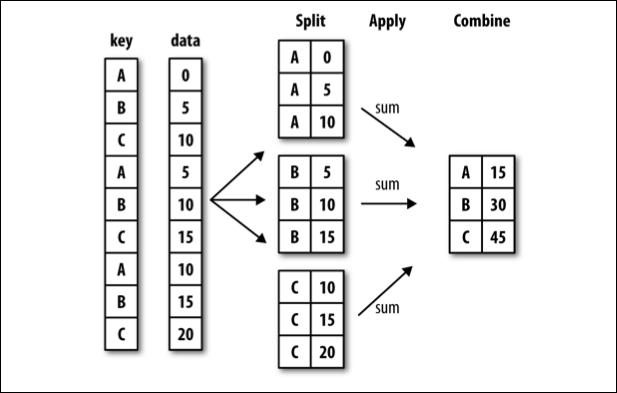
Often, you are faced with a dataset that you are interested in summaries within groups based on a condition. The simplest condition is that of a unique value in a single column. Using .groupby you can split your data into unique groups and summarize the results.
NOTE: After splitting you need to summarize!
# sample data
df = pd.DataFrame(
    {
        "A": ["foo", "bar", "foo", "bar", "foo", "bar", "foo", "foo"],
        "B": ["one", "one", "two", "three", "two", "two", "one", "three"],
        "C": np.random.randn(8),
        "D": np.random.randn(8),
    }
)
df
| A | B | C | D | |
|---|---|---|---|---|
| 0 | foo | one | 0.014738 | -0.549100 |
| 1 | bar | one | -1.515979 | -0.905696 |
| 2 | foo | two | -1.034411 | -0.157872 |
| 3 | bar | three | 0.392896 | -1.189066 |
| 4 | foo | two | -0.260686 | -0.671384 |
| 5 | bar | two | -1.633476 | 0.943162 |
| 6 | foo | one | -1.707952 | -0.037748 |
| 7 | foo | three | -0.709300 | 0.772273 |
# foo vs. bar
df.groupby('A')['C'].mean()
A
bar   -0.918853
foo   -0.739522
Name: C, dtype: float64
# one two or three?
df.groupby('B').mean(numeric_only=True)
| C | D | |
|---|---|---|
| B | ||
| one | -1.069731 | -0.497514 |
| three | -0.158202 | -0.208397 |
| two | -0.976191 | 0.037969 |
# A and B
df.groupby(['A', 'B']).mean()
| C | D | ||
|---|---|---|---|
| A | B | ||
| bar | one | -1.515979 | -0.905696 |
| three | 0.392896 | -1.189066 | |
| two | -1.633476 | 0.943162 | |
| foo | one | -0.846607 | -0.293424 |
| three | -0.709300 | 0.772273 | |
| two | -0.647549 | -0.414628 |
# working with multi-index
df.groupby(['A', 'B'], as_index=False).mean()
| A | B | C | D | |
|---|---|---|---|---|
| 0 | bar | one | -1.515979 | -0.905696 |
| 1 | bar | three | 0.392896 | -1.189066 |
| 2 | bar | two | -1.633476 | 0.943162 |
| 3 | foo | one | -0.846607 | -0.293424 |
| 4 | foo | three | -0.709300 | 0.772273 |
| 5 | foo | two | -0.647549 | -0.414628 |
# age less than 40 survival rate
titanic = sns.load_dataset('titanic')
titanic.groupby(titanic['age'] < 40)[['survived']].mean()
| survived | |
|---|---|
| age | |
| False | 0.332353 |
| True | 0.415608 |
Problems#
tips = sns.load_dataset('tips')
tips.head(2)
| total_bill | tip | sex | smoker | day | time | size | |
|---|---|---|---|---|---|---|---|
| 0 | 16.99 | 1.01 | Female | No | Sun | Dinner | 2 |
| 1 | 10.34 | 1.66 | Male | No | Sun | Dinner | 3 |
Average tip for smokers vs. non-smokers.
tips.groupby('smoker')['tip'].mean()
smoker
Yes    3.008710
No     2.991854
Name: tip, dtype: float64
Average bill by day and time.
tips.groupby(['day', 'time'])['total_bill'].mean()
day   time
Thur  Lunch     17.664754
      Dinner    18.780000
Fri   Lunch     12.845714
      Dinner    19.663333
Sat   Lunch           NaN
      Dinner    20.441379
Sun   Lunch           NaN
      Dinner    21.410000
Name: total_bill, dtype: float64
What is another question
groupbycan help us answer here?
#if size of the party made a difference in tip amount
What does the
as_indexargument do? Demonstrate an example.
#stops the groups from being the index of the result
datetime#
A special type of data for pandas are entities that can be considered as dates. We can create a special datatype for these using pd.to_datetime, and access the functions of the datetime module as a result.
# read in the AAPL data
aapl = pd.read_csv('data/AAPL.csv')
aapl.head()
| Date | Open | High | Low | Close | Adj Close | Volume | |
|---|---|---|---|---|---|---|---|
| 0 | 2005-04-25 | 5.212857 | 5.288571 | 5.158571 | 5.282857 | 3.522625 | 186615100 |
| 1 | 2005-04-26 | 5.254286 | 5.358572 | 5.160000 | 5.170000 | 3.447372 | 202626900 |
| 2 | 2005-04-27 | 5.127143 | 5.194286 | 5.072857 | 5.135714 | 3.424510 | 153472200 |
| 3 | 2005-04-28 | 5.184286 | 5.191429 | 5.034286 | 5.077143 | 3.385454 | 143776500 |
| 4 | 2005-04-29 | 5.164286 | 5.175714 | 5.031428 | 5.151429 | 3.434988 | 167907600 |
# convert to datetime
aapl['Date'] = pd.to_datetime(aapl['Date'])
# extract the month
aapl['month'] = aapl['Date'].dt.month
# extract the day
aapl['day'] = aapl['Date'].dt.day
# set date to be index of data
aapl.set_index('Date', inplace = True)
# sort the index
aapl.sort_index(inplace = True)
# select 2019
aapl.loc['2019']
| Open | High | Low | Close | Adj Close | Volume | month | day | |
|---|---|---|---|---|---|---|---|---|
| Date | ||||||||
| 2019-01-02 | 154.889999 | 158.850006 | 154.229996 | 157.919998 | 157.245605 | 37039700 | 1 | 2 |
| 2019-01-03 | 143.979996 | 145.720001 | 142.000000 | 142.190002 | 141.582779 | 91244100 | 1 | 3 |
| 2019-01-04 | 144.529999 | 148.550003 | 143.800003 | 148.259995 | 147.626846 | 58607100 | 1 | 4 |
| 2019-01-07 | 148.699997 | 148.830002 | 145.899994 | 147.929993 | 147.298264 | 54777800 | 1 | 7 |
| 2019-01-08 | 149.559998 | 151.820007 | 148.520004 | 150.750000 | 150.106216 | 41025300 | 1 | 8 |
| ... | ... | ... | ... | ... | ... | ... | ... | ... |
| 2019-04-16 | 199.460007 | 201.369995 | 198.559998 | 199.250000 | 199.250000 | 25696400 | 4 | 16 |
| 2019-04-17 | 199.539993 | 203.380005 | 198.610001 | 203.130005 | 203.130005 | 28906800 | 4 | 17 |
| 2019-04-18 | 203.119995 | 204.149994 | 202.520004 | 203.860001 | 203.860001 | 24195800 | 4 | 18 |
| 2019-04-22 | 202.830002 | 204.940002 | 202.339996 | 204.529999 | 204.529999 | 19439500 | 4 | 22 |
| 2019-04-23 | 204.429993 | 207.750000 | 203.899994 | 207.479996 | 207.479996 | 23309000 | 4 | 23 |
77 rows × 8 columns
# read back in using parse_dates = True and index_col = 0
aapl = pd.read_csv('data/AAPL.csv', parse_dates=True, index_col=0)
aapl.info()
<class 'pandas.core.frame.DataFrame'>
DatetimeIndex: 3523 entries, 2005-04-25 to 2019-04-23
Data columns (total 6 columns):
 #   Column     Non-Null Count  Dtype
---  ------     --------------  -----
 0   Open       3523 non-null   float64
 1   High       3523 non-null   float64
 2   Low        3523 non-null   float64
 3   Close      3523 non-null   float64
 4   Adj Close  3523 non-null   float64
 5   Volume     3523 non-null   int64
dtypes: float64(5), int64(1)
memory usage: 192.7 KB
from datetime import datetime
# what time is it?
then = datetime.now()
then
datetime.datetime(2023, 10, 4, 21, 45, 49, 915930)
# how much time has passed?
datetime.now() - then
datetime.timedelta(microseconds=6784)
More with timestamps#
Date times: A specific date and time with timezone support. Similar to datetime.datetime from the standard library.
Time deltas: An absolute time duration. Similar to datetime.timedelta from the standard library.
Time spans: A span of time defined by a point in time and its associated frequency.
Date offsets: A relative time duration that respects calendar arithmetic.
# create a pd.Timedelta
pd.Timedelta(5, 'D')
Timedelta('5 days 00:00:00')
# shift a date by 3 months
then + pd.Timedelta(36, 'W')
datetime.datetime(2024, 6, 12, 21, 45, 49, 915930)
Problems#
Return to the ufo data and convert the Time column to a datetime object.
ufo['Time'] = pd.to_datetime(ufo['Time'])
ufo.info()
<class 'pandas.core.frame.DataFrame'>
RangeIndex: 80543 entries, 0 to 80542
Data columns (total 5 columns):
 #   Column           Non-Null Count  Dtype
---  ------           --------------  -----
 0   City             80496 non-null  object
 1   Colors Reported  17034 non-null  object
 2   Shape Reported   72141 non-null  object
 3   State            80543 non-null  object
 4   Time             80543 non-null  datetime64[ns]
dtypes: datetime64[ns](1), object(4)
memory usage: 3.1+ MB
Set the Time column as the index column of the data.
ufo.set_index('Time', inplace = True)
Sort it
ufo.sort_index(inplace = True)
Create a new dataframe with ufo sightings since January 1, 1999
two_thousands = ufo.loc['1999':]
two_thousands.head()
| City | Colors Reported | Shape Reported | State | |
|---|---|---|---|---|
| Time | ||||
| 1999-01-01 02:30:00 | Loma Rica | NaN | LIGHT | CA |
| 1999-01-01 03:00:00 | Bauxite | NaN | NaN | AR |
| 1999-01-01 14:00:00 | Florence | NaN | CYLINDER | SC |
| 1999-01-01 15:00:00 | Lake Henshaw | NaN | CIGAR | CA |
| 1999-01-01 17:15:00 | Wilmington Island | NaN | LIGHT | GA |