

Evaluating Classification Models#
OBJECTIVES
Use the confusion matrix to evaluate classification models
Explore precision and recall as evaluation metrics
Determine cost of predicting highest probability targets
import pandas as pd
import numpy as np
import matplotlib.pyplot as plt
from sklearn.linear_model import LogisticRegression
from sklearn.neighbors import KNeighborsClassifier
from sklearn.preprocessing import StandardScaler, OneHotEncoder, PolynomialFeatures
from sklearn.compose import make_column_transformer
from sklearn.metrics import ConfusionMatrixDisplay, confusion_matrix
from sklearn.datasets import load_breast_cancer, load_digits, fetch_openml
Evaluating Classifiers#
Today, we want to think a bit more about the appropriate classification metrics in different situations. Please use this form to summarize your work.
Problem#
Below, a dataset with measurements of cancerous and non-cancerous breast tumors is loaded and displayed. Use LogisticRegression and KNeighborsClassifier to build predictive models on train/test splits. Generate a confusion matrix and explore the classifiers mistakes.
Which model do you prefer and why?
Do you care about predicting each of these classes equally?
Is there a ratio other than accuracy you think is more important based on the confusion matrix?
cancer = load_breast_cancer(as_frame=True).frame
cancer.head()
| mean radius | mean texture | mean perimeter | mean area | mean smoothness | mean compactness | mean concavity | mean concave points | mean symmetry | mean fractal dimension | ... | worst texture | worst perimeter | worst area | worst smoothness | worst compactness | worst concavity | worst concave points | worst symmetry | worst fractal dimension | target | |
|---|---|---|---|---|---|---|---|---|---|---|---|---|---|---|---|---|---|---|---|---|---|
| 0 | 17.99 | 10.38 | 122.80 | 1001.0 | 0.11840 | 0.27760 | 0.3001 | 0.14710 | 0.2419 | 0.07871 | ... | 17.33 | 184.60 | 2019.0 | 0.1622 | 0.6656 | 0.7119 | 0.2654 | 0.4601 | 0.11890 | 0 |
| 1 | 20.57 | 17.77 | 132.90 | 1326.0 | 0.08474 | 0.07864 | 0.0869 | 0.07017 | 0.1812 | 0.05667 | ... | 23.41 | 158.80 | 1956.0 | 0.1238 | 0.1866 | 0.2416 | 0.1860 | 0.2750 | 0.08902 | 0 |
| 2 | 19.69 | 21.25 | 130.00 | 1203.0 | 0.10960 | 0.15990 | 0.1974 | 0.12790 | 0.2069 | 0.05999 | ... | 25.53 | 152.50 | 1709.0 | 0.1444 | 0.4245 | 0.4504 | 0.2430 | 0.3613 | 0.08758 | 0 |
| 3 | 11.42 | 20.38 | 77.58 | 386.1 | 0.14250 | 0.28390 | 0.2414 | 0.10520 | 0.2597 | 0.09744 | ... | 26.50 | 98.87 | 567.7 | 0.2098 | 0.8663 | 0.6869 | 0.2575 | 0.6638 | 0.17300 | 0 |
| 4 | 20.29 | 14.34 | 135.10 | 1297.0 | 0.10030 | 0.13280 | 0.1980 | 0.10430 | 0.1809 | 0.05883 | ... | 16.67 | 152.20 | 1575.0 | 0.1374 | 0.2050 | 0.4000 | 0.1625 | 0.2364 | 0.07678 | 0 |
5 rows × 31 columns
Problem#
Below, a dataset around customer churn is loaded and displayed. Build classification models on the data and visualize the confusion matrix.
Suppose you want to offer an incentive to customers you think are likely to churn, what is an appropriate evaluation metric?
Suppose you only have a budget to target 100 individuals you expect to churn. By targeting the most likely predictions to churn, what percent of churned customers did you capture?
churn = fetch_openml(data_id = 43390).frame
churn.head()
| RowNumber | CustomerId | Surname | CreditScore | Geography | Gender | Age | Tenure | Balance | NumOfProducts | HasCrCard | IsActiveMember | EstimatedSalary | Exited | |
|---|---|---|---|---|---|---|---|---|---|---|---|---|---|---|
| 0 | 1 | 15634602 | Hargrave | 619 | France | Female | 42 | 2 | 0.00 | 1 | 1 | 1 | 101348.88 | 1 |
| 1 | 2 | 15647311 | Hill | 608 | Spain | Female | 41 | 1 | 83807.86 | 1 | 0 | 1 | 112542.58 | 0 |
| 2 | 3 | 15619304 | Onio | 502 | France | Female | 42 | 8 | 159660.80 | 3 | 1 | 0 | 113931.57 | 1 |
| 3 | 4 | 15701354 | Boni | 699 | France | Female | 39 | 1 | 0.00 | 2 | 0 | 0 | 93826.63 | 0 |
| 4 | 5 | 15737888 | Mitchell | 850 | Spain | Female | 43 | 2 | 125510.82 | 1 | 1 | 1 | 79084.10 | 0 |
Problem#
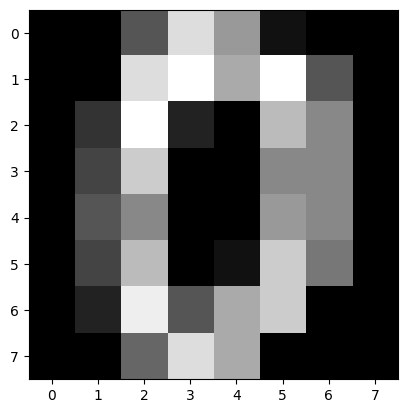
Below a dataset containing handwritten digit images is loaded and displayed. Build a classifier to predict 3’s correctly (change it to a binary classification problem).
Compare the result of the confusion matrix if you use the default probability threshold to one where anything with a 30% chance of being a 3 is labeled a 3.
How do the confusion matrices change?
Can you think of a different situation where you might do something like this – changing the prediction threshold?
from sklearn.datasets import load_digits
digits = load_digits(as_frame=True).frame
digits.head(3)
| pixel_0_0 | pixel_0_1 | pixel_0_2 | pixel_0_3 | pixel_0_4 | pixel_0_5 | pixel_0_6 | pixel_0_7 | pixel_1_0 | pixel_1_1 | ... | pixel_6_7 | pixel_7_0 | pixel_7_1 | pixel_7_2 | pixel_7_3 | pixel_7_4 | pixel_7_5 | pixel_7_6 | pixel_7_7 | target | |
|---|---|---|---|---|---|---|---|---|---|---|---|---|---|---|---|---|---|---|---|---|---|
| 0 | 0.0 | 0.0 | 5.0 | 13.0 | 9.0 | 1.0 | 0.0 | 0.0 | 0.0 | 0.0 | ... | 0.0 | 0.0 | 0.0 | 6.0 | 13.0 | 10.0 | 0.0 | 0.0 | 0.0 | 0 |
| 1 | 0.0 | 0.0 | 0.0 | 12.0 | 13.0 | 5.0 | 0.0 | 0.0 | 0.0 | 0.0 | ... | 0.0 | 0.0 | 0.0 | 0.0 | 11.0 | 16.0 | 10.0 | 0.0 | 0.0 | 1 |
| 2 | 0.0 | 0.0 | 0.0 | 4.0 | 15.0 | 12.0 | 0.0 | 0.0 | 0.0 | 0.0 | ... | 0.0 | 0.0 | 0.0 | 0.0 | 3.0 | 11.0 | 16.0 | 9.0 | 0.0 | 2 |
3 rows × 65 columns
plt.imshow(digits.iloc[0, :-1].values.reshape(8, 8), cmap = 'gray')
<matplotlib.image.AxesImage at 0x1235b9610>
scikit-learn visualizers#
PrecisionRecallDisplayROCurveDisplay
from skplot docs
plot_cumulative_gain
from sklearn.metrics import PrecisionRecallDisplay, RocCurveDisplay
import scikitplot as skplot